108 lines
5.6 KiB
XML
108 lines
5.6 KiB
XML
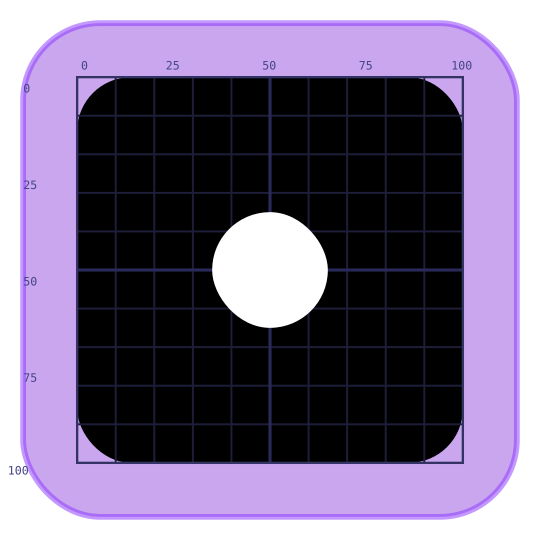


<?xml version="1.0" encoding="UTF-8" standalone="no"?>
|
|
<!--
|
|
ITALIC NEON — PATTERN TEMPLATE
|
|
================================
|
|
HOW TO USE:
|
|
1. File > Save As > pattern-01.svg (increment number for each new pattern)
|
|
2. Edit ONLY the "Pattern (edit this)" layer — all other layers are guides
|
|
3. Draw white shapes (fill="#ffffff") within the 0-100 coordinate area
|
|
4. Shapes: use <rect rx="..." ry="..."> for circles/pills, or <ellipse>
|
|
- Circle: <rect x="35" y="35" width="30" height="30" rx="15" ry="15" fill="#ffffff"/>
|
|
- Horizontal pill: <rect x="20" y="42" width="60" height="16" rx="8" ry="8" fill="#ffffff"/>
|
|
- Ellipse: <ellipse cx="50" cy="50" rx="25" ry="15" fill="#ffffff"/>
|
|
5. Stay within x: 0-100, y: 0-100. Leave ~5 units of margin from edges.
|
|
6. Aim for 1-8 shapes, non-overlapping, with geometric/symmetric relations.
|
|
7. The skew is applied at render time — draw flat, it will look correct in the icon.
|
|
|
|
The black rect is the inner icon area. The purple rect is the outer chrome (color varies per project at runtime).
|
|
-->
|
|
<svg
|
|
width="540"
|
|
height="540"
|
|
viewBox="-20 -20 140 140"
|
|
version="1.1"
|
|
id="template"
|
|
inkscape:version="1.4.3"
|
|
xmlns:inkscape="http://www.inkscape.org/namespaces/inkscape"
|
|
xmlns:sodipodi="http://sodipodi.sourceforge.net/DTD/sodipodi-0.0.dtd"
|
|
xmlns="http://www.w3.org/2000/svg">
|
|
|
|
<sodipodi:namedview
|
|
id="namedview"
|
|
pagecolor="#1a1a2e"
|
|
bordercolor="#555555"
|
|
inkscape:document-units="px"
|
|
showgrid="true"
|
|
inkscape:current-layer="layer-pattern">
|
|
<inkscape:grid type="xygrid" units="px" spacingx="5" spacingy="5" empspacing="2"
|
|
color="#2a2a4a" empcolor="#3a3a6a" opacity="0.8" empopacity="1"/>
|
|
</sodipodi:namedview>
|
|
|
|
<!-- CHROME GUIDE — locked, context only, not exported as pattern data -->
|
|
<g inkscape:label="Chrome (guide — do not edit)"
|
|
inkscape:groupmode="layer"
|
|
id="layer-chrome"
|
|
sodipodi:insensitive="true">
|
|
<!-- Outer colored rect: placeholder purple, will use project color at runtime -->
|
|
<rect x="-14" y="-14" width="128" height="128" rx="20" ry="20"
|
|
fill="#6600cc" opacity="0.35"/>
|
|
<!-- Glow hint -->
|
|
<rect x="-14" y="-14" width="128" height="128" rx="20" ry="20"
|
|
fill="none" stroke="#8833ff" stroke-width="1.5" opacity="0.5"/>
|
|
<!-- Inner black area = the 0,0 → 100,100 pattern space -->
|
|
<rect x="0" y="0" width="100" height="100" rx="14" ry="14"
|
|
fill="#000000"/>
|
|
</g>
|
|
|
|
<!-- GRID GUIDE — locked -->
|
|
<g inkscape:label="Grid (guide — do not edit)"
|
|
inkscape:groupmode="layer"
|
|
id="layer-grid"
|
|
sodipodi:insensitive="true">
|
|
<!-- Minor lines every 10 units -->
|
|
<line x1="10" y1="0" x2="10" y2="100" stroke="#1e1e3a" stroke-width="0.5"/>
|
|
<line x1="20" y1="0" x2="20" y2="100" stroke="#1e1e3a" stroke-width="0.5"/>
|
|
<line x1="30" y1="0" x2="30" y2="100" stroke="#1e1e3a" stroke-width="0.5"/>
|
|
<line x1="40" y1="0" x2="40" y2="100" stroke="#1e1e3a" stroke-width="0.5"/>
|
|
<line x1="60" y1="0" x2="60" y2="100" stroke="#1e1e3a" stroke-width="0.5"/>
|
|
<line x1="70" y1="0" x2="70" y2="100" stroke="#1e1e3a" stroke-width="0.5"/>
|
|
<line x1="80" y1="0" x2="80" y2="100" stroke="#1e1e3a" stroke-width="0.5"/>
|
|
<line x1="90" y1="0" x2="90" y2="100" stroke="#1e1e3a" stroke-width="0.5"/>
|
|
<line x1="0" y1="10" x2="100" y2="10" stroke="#1e1e3a" stroke-width="0.5"/>
|
|
<line x1="0" y1="20" x2="100" y2="20" stroke="#1e1e3a" stroke-width="0.5"/>
|
|
<line x1="0" y1="30" x2="100" y2="30" stroke="#1e1e3a" stroke-width="0.5"/>
|
|
<line x1="0" y1="40" x2="100" y2="40" stroke="#1e1e3a" stroke-width="0.5"/>
|
|
<line x1="0" y1="60" x2="100" y2="60" stroke="#1e1e3a" stroke-width="0.5"/>
|
|
<line x1="0" y1="70" x2="100" y2="70" stroke="#1e1e3a" stroke-width="0.5"/>
|
|
<line x1="0" y1="80" x2="100" y2="80" stroke="#1e1e3a" stroke-width="0.5"/>
|
|
<line x1="0" y1="90" x2="100" y2="90" stroke="#1e1e3a" stroke-width="0.5"/>
|
|
<!-- Center crosshair -->
|
|
<line x1="50" y1="0" x2="50" y2="100" stroke="#2a2a5a" stroke-width="0.8"/>
|
|
<line x1="0" y1="50" x2="100" y2="50" stroke="#2a2a5a" stroke-width="0.8"/>
|
|
<!-- Pattern area border -->
|
|
<rect x="0" y="0" width="100" height="100" fill="none" stroke="#333366" stroke-width="0.6"/>
|
|
<!-- Quarter markers -->
|
|
<rect x="25" y="0" width="50" height="0" fill="none" stroke="#2a2a5a" stroke-width="0.4"/>
|
|
<text x="1" y="-2" font-size="3" fill="#444488" font-family="monospace">0</text>
|
|
<text x="23" y="-2" font-size="3" fill="#444488" font-family="monospace">25</text>
|
|
<text x="48" y="-2" font-size="3" fill="#444488" font-family="monospace">50</text>
|
|
<text x="73" y="-2" font-size="3" fill="#444488" font-family="monospace">75</text>
|
|
<text x="97" y="-2" font-size="3" fill="#444488" font-family="monospace">100</text>
|
|
<text x="-14" y="4" font-size="3" fill="#444488" font-family="monospace">0</text>
|
|
<text x="-14" y="29" font-size="3" fill="#444488" font-family="monospace">25</text>
|
|
<text x="-14" y="54" font-size="3" fill="#444488" font-family="monospace">50</text>
|
|
<text x="-14" y="79" font-size="3" fill="#444488" font-family="monospace">75</text>
|
|
<text x="-18" y="103" font-size="3" fill="#444488" font-family="monospace">100</text>
|
|
</g>
|
|
|
|
<!-- PATTERN — edit this layer only -->
|
|
<!-- Shapes must use fill="#ffffff". Stay within 0-100. -->
|
|
<g inkscape:label="Pattern (edit this)"
|
|
inkscape:groupmode="layer"
|
|
id="layer-pattern">
|
|
<!-- Example: single centered circle. Replace with your design. -->
|
|
<rect x="35" y="35" width="30" height="30" rx="15" ry="15" fill="#ffffff"/>
|
|
</g>
|
|
|
|
</svg>
|